

As AI developers, we often find ourselves using powerful language models like those from OpenAI or other frontier LLM model. While OpenAI’s Python library is great, managing prompts, chaining tasks, or interacting with external tools can get messy fast.
That’s where LangChain comes in.
In this post, we’ll look at:
- What LangChain is
- Step by step guide to use LangChain
- A sample project for text-translator-app.
What is LangChain?
LangChain is a tool that helps you build smart apps using AI language models like ChatGPT. Instead of writing all the logic yourself, it connects useful parts—like prompts, memory, tools, and more—so everything works smoothly together. It makes AI app development easier and more organized.
What’s in the LangChain toolkit?
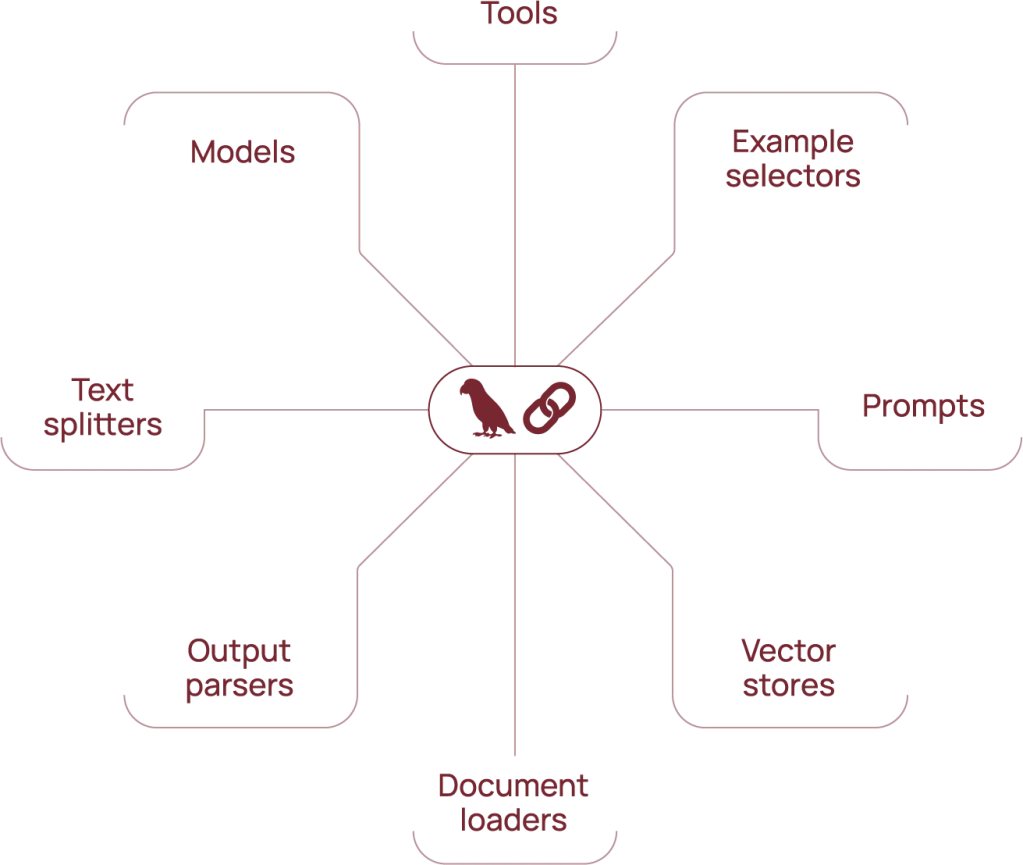
Models: The brain—like GPT—that generates text.
Text splitters: Break big documents into smaller chunks.
Output parsers: Convert messy AI output into clean data.
Document loaders: Pull in text from files, web pages, etc.
Vector stores: Save and search document chunks using embeddings.
Prompts: Instructions you give to the model.
Example selectors: Pick the best examples to include in prompts.
Tools: Add extra abilities like using a calculator or searching the web.
Step by Step guide to use LangChain to build text translator app.
Before we dive in, just a quick note — all the code examples in this post are available in our GitHub repo for easy access and reference.

Step 1: Install the Required Packages
pip install streamlit langchain python-dotenv openai langchain_communityOr use a requirements.txt file:
git location here
streamlit
python-dotenv
langchain
langchain_community
openai
pip install -r requirements.txtStep 2: Get Your OpenAI API Key and .env file setup
If you don’t have your OpenAI key yet, check our previous blog post Your First LLM App where we show how to generate and store it securely using a .env file.
Create a .env file in your project root and add:
OPENAI_API_KEY=<your_api_key>
OPENAI_API_MODEL=gpt-4o-mini
Step 3: Create the LLMChain.
from langchain.chains.llm import LLMChain
from langchain.chat_models import ChatOpenAI
import streamlit as st
import os

from dotenv import load_dotenv, find_dotenv
from langchain_core.prompts import PromptTemplate

_ = load_dotenv(find_dotenv())

llm_model=os.environ['OPENAI_API_MODEL']

langChanllm = ChatOpenAI(temperature=0.0, model=llm_model)

template_string = """Translate the text \
that is delimited by triple backticks \
into {language} in style {style}. \
text: ```{text}```
"""
prompt = PromptTemplate(input_variables=["text", "language", "style"], template=template_string)

translator_chain = LLMChain(llm=langChanllm, prompt=prompt)
Quick Code Breakdown
load_dotenv(): Loads your API key from.envfile.PromptTemplate: Lets you reuse and format prompts cleanly.LLMChain: Connects the language model with the prompt and user input.
Step 4: Use LLMChain in Streamlit app
#Streamlit app UI
st.title("Text Translator App 🖥️")
text = st.text_area("Enter text to translate")
language = st.text_area("Enter language to translate (e.g., French, Spanish, Japanese)")
style = st.text_input("Enter style (polite ton, formal ton, funny ton)")

if st.button("Translate"):
    if text and language and style:
        result = translator_chain.run(language=language, text=text, style=style)
        st.success(result)
    else:
st.warning("Please enter both the text and target language.")st.text_area/st.text_input: Streamlit elements to collect user input.translator_chain.run(...): Sends the prompt to the model and returns the result.
Step 5: Run the application.
streamlit run app.py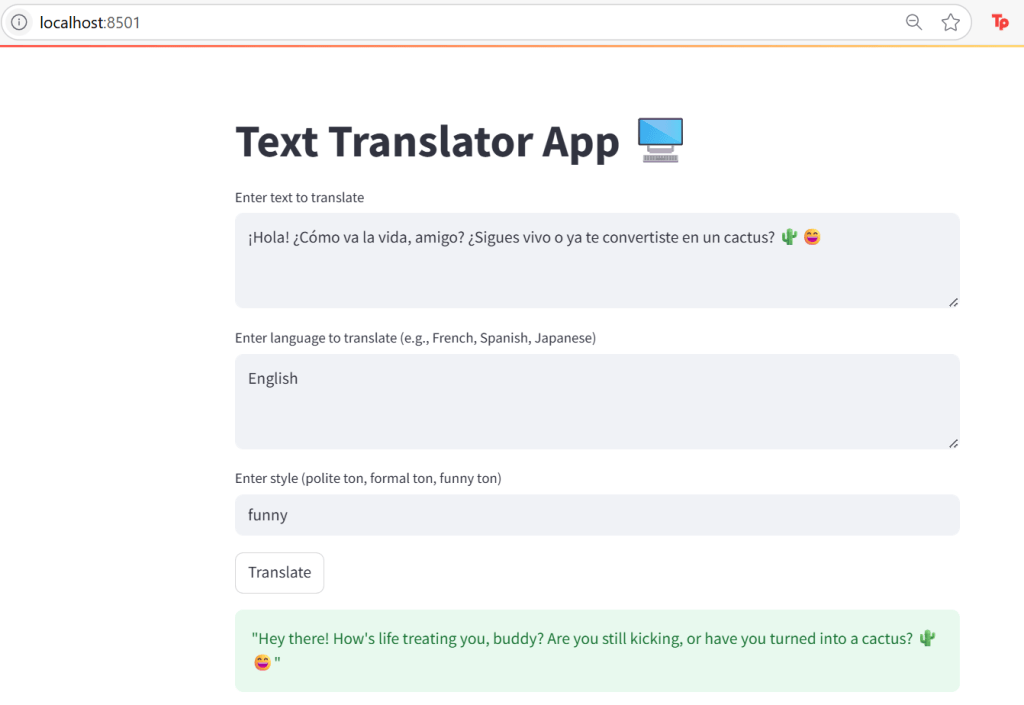
All the code and setup instruction you can find in our github here
Finally lets understand LLMChain of Langchain
LLMChain is one of the most basic and essential building blocks in LangChain.
It connects:
- A PromptTemplate (the text instruction you want to send),
- To a language model (like OpenAI’s GPT),
- And gives you back the LLM output.
🧱 Prompt + 🧠 LLM → LLMChain → 🎯 Result
We hope this blog helped you set up your first LangChain project with confidence. This is just the beginning — we’ll continue to explore the growing LLM ecosystem in future posts, diving deeper into LangChain features like memory management, agents, tools, and advanced chaining techniques. Stay tuned for hands-on examples and real-world use cases to help you build smarter, more powerful AI applications.

 NextWeb Spark (Ireland)
Leave a comment